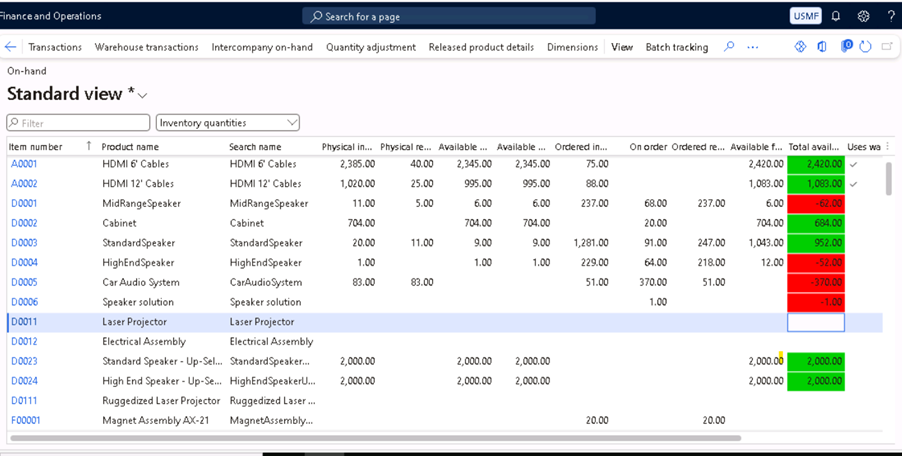
The purpose of this document is to demonstrate how to dynamically apply color formatting to a specific form control in a grid based on a business condition in X++.
In this scenario, the requirement is to highlight the AvailOrdered field (display method) in the InventOnhandItem form:
Show Red when the value is negative.
Show Green when the value is positive.
Development Approach
The customization is implemented through X++ code by extending the form data source.
The logic is implemented at the data source level to dynamically evaluate the display method value and apply color formatting during runtime.
Since AvailOrdered is a display method, the color formatting can be handled through the form data source's displayOption() method.
The following approach is used:
Override
displayOption()on the form data source.Call the display method to retrieve the calculated value.
Get the specific form control using
controlName().Apply the background color using
FormRowDisplayOption.Use
affectedElementsByControl()so that the formatting only affects the targeted control.
Development
Step 1: Override displayOption() on the Form Data Source
Create a form data source extension for the InventSum data source on the InventOnhandItem form.
[ExtensionOf(formDataSourceStr(InventOnhandItem, InventSum))]
final class InventOnhandItem_InventSum_Extension
{
    public void displayOption(
        Common _record,
        FormRowDisplayOption _options)
    {
        real availOrderedValue;
        FormControl ctrl;

        next displayOption(_record, _options);

        // Call the display method from the data source
        // to get the calculated AvailOrdered value.
        availOrderedValue = this.availOrderedCalculated(_record);

        // Get the specific form control by name.
        // Make sure the control name matches the actual
        // control name on the form.
        ctrl = this.formRun()
                   .design()
                   .controlName(identifierStr(AvailOrdered));

        if (ctrl)
        {
            // Apply red background when the value is negative.
            if (availOrderedValue < 0)
            {
                _options.affectedElementsByControl(ctrl.id());
                _options.backColor(
                    WinAPI::RGB2int(255, 0, 0));
            }

            // Apply green background when the value is positive.
            if (availOrderedValue > 0)
            {
                _options.affectedElementsByControl(ctrl.id());
                _options.backColor(
                    WinAPI::RGB2int(0, 204, 0));
            }
        }
    }
}